> ## Documentation Index
> Fetch the complete documentation index at: https://smithery.ai/docs/llms.txt
> Use this file to discover all available pages before exploring further.
# What is MCP?
> What is MCP? How does it work? What does Smithery do with MCP?
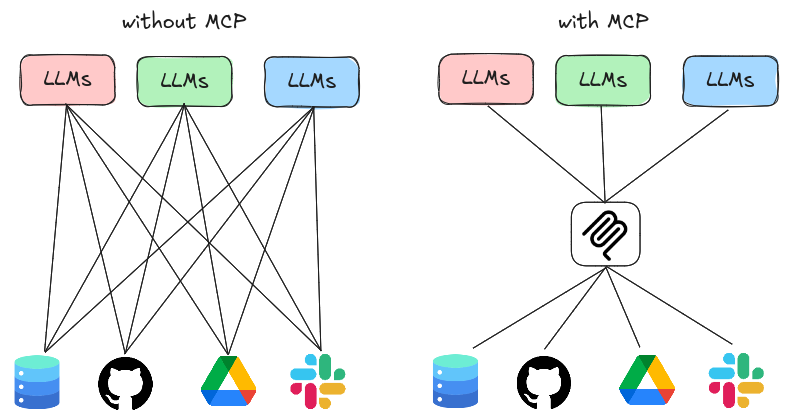 # What is MCP?
MCP (Model Context Protocol) is an open standard that enables LLMs to access bespoke tools and context, as long as the LLM supports MCP and the tool implements the MCP protocol.
### Use Cases
Broadly speaking, MCP is useful when you want your LLM to get information from the outside world or perform actions on your behalf:
* **Context**: Context is data that can be used by the LLM that may not be available in the LLM's training data. For example, your LLM might want to search the web or access internal company data.
* **Tools**: Tools are functions that can be called by the LLM. This can be something like "open a pull request from one branch into main" or "send an email to a specific person".
### Servers, Clients, and Transports
MCP, just like HTTP, is a client-server protocol. The **client** is the LLM, and the **server** exposes tools to the LLM. The client and server communicate over a **transport**, which can be fully local or over the internet.
* **Servers** expose tools to a client.
* **Clients** can call tools on a server.
* **Transports** are how the client and server communicate with each other. This can be local (STDIO), over the internet (HTTP), or even over a custom transport.
Learn more about MCP from the Model Context Protocol website
(modelcontextprotocol.io)
# What does Smithery do with MCP?
Smithery is a platform that connects MCP servers with users. We allow users to find the right MCP server for their needs, and we allow developers to publish MCP servers for distribution.
We have a diverse mix of MCP servers, both local (STDIO) and over the internet (HTTP). Here are some popular ones:
* [Desktop Commander](https://smithery.ai/servers/@wonderwhy-er/desktop-commander) (Local, STDIO): Allow apps like Claude Desktop to run terminal commands on your computer.
* [Exa](https://smithery.ai/servers/exa) (Remote, HTTP): Access live web search results. Do Deep Research, get LinkedIn profiles, and more!
* [Context7](https://smithery.ai/servers/@upstash/context7-mcp) (Remote, HTTP): Let your IDE agent like Cursor Composer access documentation for your favorite libraries and SDKs.
* [Browserbase](https://smithery.ai/servers/@browserbasehq/mcp-browserbase) (Remote, HTTP): Use Claude Desktop/Cursor to control a remote web browser.
You can also publish your own MCP servers on Smithery!
Learn how to publish your MCP server to Smithery for distribution and observability
# What is MCP?
MCP (Model Context Protocol) is an open standard that enables LLMs to access bespoke tools and context, as long as the LLM supports MCP and the tool implements the MCP protocol.
### Use Cases
Broadly speaking, MCP is useful when you want your LLM to get information from the outside world or perform actions on your behalf:
* **Context**: Context is data that can be used by the LLM that may not be available in the LLM's training data. For example, your LLM might want to search the web or access internal company data.
* **Tools**: Tools are functions that can be called by the LLM. This can be something like "open a pull request from one branch into main" or "send an email to a specific person".
### Servers, Clients, and Transports
MCP, just like HTTP, is a client-server protocol. The **client** is the LLM, and the **server** exposes tools to the LLM. The client and server communicate over a **transport**, which can be fully local or over the internet.
* **Servers** expose tools to a client.
* **Clients** can call tools on a server.
* **Transports** are how the client and server communicate with each other. This can be local (STDIO), over the internet (HTTP), or even over a custom transport.
Learn more about MCP from the Model Context Protocol website
(modelcontextprotocol.io)
# What does Smithery do with MCP?
Smithery is a platform that connects MCP servers with users. We allow users to find the right MCP server for their needs, and we allow developers to publish MCP servers for distribution.
We have a diverse mix of MCP servers, both local (STDIO) and over the internet (HTTP). Here are some popular ones:
* [Desktop Commander](https://smithery.ai/servers/@wonderwhy-er/desktop-commander) (Local, STDIO): Allow apps like Claude Desktop to run terminal commands on your computer.
* [Exa](https://smithery.ai/servers/exa) (Remote, HTTP): Access live web search results. Do Deep Research, get LinkedIn profiles, and more!
* [Context7](https://smithery.ai/servers/@upstash/context7-mcp) (Remote, HTTP): Let your IDE agent like Cursor Composer access documentation for your favorite libraries and SDKs.
* [Browserbase](https://smithery.ai/servers/@browserbasehq/mcp-browserbase) (Remote, HTTP): Use Claude Desktop/Cursor to control a remote web browser.
You can also publish your own MCP servers on Smithery!
Learn how to publish your MCP server to Smithery for distribution and observability