

Building an NBA MCP Server
Building an NBA MCP Server
The NBA season is only a couple of days old, and is already mired in controversy. But if you’re still interested in the actual sport and want to follow the season, we have the MCP server for you. Instead of manually searching for scores across different websites, tracking player stats in spreadsheets, and piecing together standings from various sources. This NBA MCP server that gives you instant access to live games, player statistics, team standings, and historical data through natural language queries.
By connecting to ESPN’s NBA API, we can query game data, player stats, and team information directly from Claude or any other MCP client.
Want to know today’s games? Just ask.
Need to compare player stats? Simple query. Curious about upsets? It’s all there.
The server will provide six core tools:
- get_todays_games: Live scores and game status for today’s matchups
- get_games_by_date: Historical or scheduled games for any specific date
- get_player_stats: Current season statistics for any player
- get_team_standings: Current standings with wins, losses, and rankings
- get_historical_player_stats: Player performance from previous seasons
- get_team_stats: Team metrics and advanced analytics
We’ll build this in both TypeScript and Python, so you can use whichever language you prefer.
Installing Our Dependencies
TypeScript Setup
For TypeScript, we need the MCP SDK and node-fetch for making HTTP requests:
mkdir nba-mcp-server
cd nba-mcp-server
npm init -y
npm install @modelcontextprotocol/sdk node-fetch
npm install --save-dev typescript @types/node
npx tsc --init
Our package.json should look like this:
{
  "name": "nba-mcp-server",
  "version": "1.0.0",
  "description": "MCP server for live and historic NBA data",
  "type": "module",
  "main": "build/index.js",
  "bin": {
    "nba-mcp-server": "build/index.js"
  },
  "scripts": {
    "build": "tsc",
    "watch": "tsc --watch",
    "prepare": "npm run build"
  },
  "dependencies": {
    "@modelcontextprotocol/sdk": "^1.0.4",
    "node-fetch": "^3.3.2"
  },
  "devDependencies": {
    "@types/node": "^22.10.5",
    "typescript": "^5.7.2"
  }
}
And our tsconfig.json:
{
  "compilerOptions": {
    "target": "ES2022",
    "module": "Node16",
    "moduleResolution": "Node16",
    "outDir": "./build",
    "rootDir": "./src",
    "strict": true,
    "esModuleInterop": true,
    "skipLibCheck": true,
    "forceConsistentCasingInFileNames": true,
    "resolveJsonModule": true,
    "declaration": true,
    "sourceMap": true
  },
  "include": ["src/**/*"],
  "exclude": ["node_modules", "build"]
}
Python Setup
Using uv for package management, Python setup is straightforward:
mkdir nba-mcp-python
cd nba-mcp-python
uv init
uv add "mcp[cli]" httpx
Our pyproject.toml should specify:
[project]
name = "nba-mcp-server"
version = "1.0.0"
description = "MCP server for live and historic NBA data"
requires-python = ">=3.10"
dependencies = [
    "mcp>=1.1.0",
    "httpx>=0.27.0",
]

[project.scripts]
nba-mcp-server = "nba_mcp_server.server:main"
Building the NBA API Client
Before we can create MCP tools, we need functions to fetch data from ESPN’s API. We’ll create an API client that handles all the HTTP requests and data parsing.
Defining Our Data Structures
First, we define the types we’ll work with. These represent NBA games, player statistics, and team standings:
TypeScript (src/nba-api.ts):
export interface GameScore {
  gameId: string;
  gameDate: string;
  homeTeam: string;
  awayTeam: string;
  homeScore: number;
  awayScore: number;
  gameStatus: string;
}

export interface PlayerStats {
  playerId: string;
  playerName: string;
  teamAbbreviation: string;
  points: number;
  rebounds: number;
  assists: number;
  steals: number;
  blocks: number;
  fieldGoalPercentage: number;
  gamesPlayed: number;
}

export interface TeamStanding {
  teamId: string;
  teamName: string;
  wins: number;
  losses: number;
  winPercentage: number;
  conference: string;
  division: string;
}
Python (src/nba_mcp_server/nba_api.py):
from dataclasses import dataclass

@dataclass
class GameScore:
    """Represents an NBA game with scores and status."""
    game_id: str
    game_date: str
    home_team: str
    away_team: str
    home_score: int
    away_score: int
    game_status: str

@dataclass
class PlayerStats:
    """Represents NBA player statistics."""
    player_id: str
    player_name: str
    team_abbreviation: str
    points: float
    rebounds: float
    assists: float
    steals: float
    blocks: float
    field_goal_percentage: float
    games_played: int

@dataclass
class TeamStanding:
    """Represents NBA team standings."""
    team_id: str
    team_name: str
    wins: int
    losses: int
    win_percentage: float
    conference: str
    division: str
These dataclasses and interfaces serve as contracts between the ESPN API and our MCP tools. By defining explicit types, we catch errors early and make the code self-documenting for anyone reading it later.
Fetching Game Data
The ESPN API provides a scoreboard endpoint that returns today’s games by default, or games for a specific date when we include a date parameter.
TypeScript:
import fetch from "node-fetch";

const ESPN_API_BASE =
  "https://site.api.espn.com/apis/site/v2/sports/basketball/nba";

export async function getTodaysGames(): Promise<GameScore[]> {
  const url = `${ESPN_API_BASE}/scoreboard`;
  const response = await fetch(url);
  const data = (await response.json()) as any;
  return parseGamesFromESPN(data);
}

export async function getGamesByDate(date: string): Promise<GameScore[]> {
  // Convert YYYY-MM-DD to YYYYMMDD for ESPN
  const dateStr = date.replace(/-/g, "");
  const url = `${ESPN_API_BASE}/scoreboard?dates=${dateStr}`;
  const response = await fetch(url);
  const data = (await response.json()) as any;
  return parseGamesFromESPN(data);
}
Python:
import httpx

ESPN_API_BASE = "https://site.api.espn.com/apis/site/v2/sports/basketball/nba"

async def get_todays_games() -> list[GameScore]:
    """Fetch today's NBA games and scores."""
    async with httpx.AsyncClient() as client:
        url = f"{ESPN_API_BASE}/scoreboard"
        response = await client.get(url)
        response.raise_for_status()
        data = response.json()
        return _parse_games_from_espn(data)

async def get_games_by_date(date: str) -> list[GameScore]:
    """Fetch games for a specific date (YYYY-MM-DD format)."""
    date_str = date.replace("-", "")
    async with httpx.AsyncClient() as client:
        url = f"{ESPN_API_BASE}/scoreboard?dates={date_str}"
        response = await client.get(url)
        response.raise_for_status()
        data = response.json()
        return _parse_games_from_espn(data)
Parsing ESPN’s Response Format
ESPN’s API returns game data in a nested structure. We need to extract the relevant information and convert it into our GameScore objects.
The structure looks like this:
events[]contains all games- Each event has
competitions[]with game details - Each competition has
competitors[]for home and away teams - Team scores and status are nested within these structures
TypeScript:
function parseGamesFromESPN(data: any): GameScore[] {
  const games: GameScore[] = [];

  if (data.events) {
    for (const event of data.events) {
      const competition = event.competitions?.[0];
      if (!competition) continue;

      const homeTeam = competition.competitors.find(
        (c: any) => c.homeAway === "home"
      );
      const awayTeam = competition.competitors.find(
        (c: any) => c.homeAway === "away"
      );

      games.push({
        gameId: event.id,
        gameDate: event.date,
        homeTeam: homeTeam?.team?.displayName || "Unknown",
        awayTeam: awayTeam?.team?.displayName || "Unknown",
        homeScore: parseInt(homeTeam?.score) || 0,
        awayScore: parseInt(awayTeam?.score) || 0,
        gameStatus: event.status?.type?.description || "Unknown",
      });
    }
  }

  return games;
}
Python:
def _parse_games_from_espn(data: dict) -> list[GameScore]:
    """Parse games from ESPN API response."""
    games = []
    events = data.get("events", [])

    for event in events:
        competitions = event.get("competitions", [])
        if not competitions:
            continue

        competition = competitions[0]
        competitors = competition.get("competitors", [])

        home_team = next((c for c in competitors if c.get("homeAway") == "home"), None)
        away_team = next((c for c in competitors if c.get("homeAway") == "away"), None)

        if home_team and away_team:
            games.append(GameScore(
                game_id=event.get("id", ""),
                game_date=event.get("date", ""),
                home_team=home_team.get("team", {}).get("displayName", "Unknown"),
                away_team=away_team.get("team", {}).get("displayName", "Unknown"),
                home_score=int(home_team.get("score", 0)),
                away_score=int(away_team.get("score", 0)),
                game_status=event.get("status", {}).get("type", {}).get("description", "Unknown")
            ))

    return games
The parsing function handles missing data gracefully, defaulting to 'Unknown' and zero scores when ESPN's response doesn't include expected fields. This is crucial because API responses can be inconsistent, especially for games that haven't started yet or are in unusual states.
Fetching Player Statistics
ESPN doesn’t provide a single endpoint for all player stats, so we need to aggregate data from team rosters. We’ll fetch each team’s roster and extract player statistics from there.
TypeScript:
export async function getPlayerStats(
  playerName?: string,
  limit: number = 50
): Promise<PlayerStats[]> {
  const url = `${ESPN_API_BASE}/teams`;
  const response = await fetch(url);
  const data = (await response.json()) as any;

  const players: PlayerStats[] = [];

  if (data.sports?.[0]?.leagues?.[0]?.teams) {
    const teams = data.sports[0].leagues[0].teams;

    // Limit teams to avoid rate limiting
    for (const teamObj of teams.slice(0, 10)) {
      const team = teamObj.team;
      try {
        const rosterUrl = `${ESPN_API_BASE}/teams/${team.id}/roster`;
        const rosterResponse = await fetch(rosterUrl);
        const rosterData = (await rosterResponse.json()) as any;

        if (rosterData.athletes) {
          for (const athleteGroup of rosterData.athletes) {
            for (const athlete of athleteGroup.items || []) {
              const stats = athlete.stats?.[0] || {};
              const player: PlayerStats = {
                playerId: athlete.id,
                playerName: athlete.displayName,
                teamAbbreviation: team.abbreviation,
                points: parseFloat(stats.ppg) || 0,
                rebounds: parseFloat(stats.rpg) || 0,
                assists: parseFloat(stats.apg) || 0,
                steals: parseFloat(stats.spg) || 0,
                blocks: parseFloat(stats.bpg) || 0,
                fieldGoalPercentage: parseFloat(stats.fgPct) || 0,
                gamesPlayed: parseInt(stats.gp) || 0,
              };

              if (
                !playerName ||
                player.playerName
                  .toLowerCase()
                  .includes(playerName.toLowerCase())
              ) {
                players.push(player);
                if (players.length >= limit) {
                  return players;
                }
              }
            }
          }
        }
      } catch (err) {
        continue;
      }
    }
  }

  return players.slice(0, limit);
}
Python:
async def get_player_stats(player_name: Optional[str] = None, limit: int = 50) -> list[PlayerStats]:
    """Fetch current season player statistics."""
    async with httpx.AsyncClient() as client:
        teams_url = f"{ESPN_API_BASE}/teams"
        teams_response = await client.get(teams_url)
        teams_response.raise_for_status()
        teams_data = teams_response.json()

        players = []
        sports = teams_data.get("sports", [])
        if not sports:
            return players

        leagues = sports[0].get("leagues", [])
        if not leagues:
            return players

        teams = leagues[0].get("teams", [])

        for team_obj in teams[:10]:
            team = team_obj.get("team", {})
            team_id = team.get("id")
            team_abbr = team.get("abbreviation", "")

            try:
                roster_url = f"{ESPN_API_BASE}/teams/{team_id}/roster"
                roster_response = await client.get(roster_url)
                roster_response.raise_for_status()
                roster_data = roster_response.json()

                athletes = roster_data.get("athletes", [])
                for athlete_group in athletes:
                    items = athlete_group.get("items", [])
                    for athlete in items:
                        stats = athlete.get("stats", [{}])[0] if athlete.get("stats") else {}

                        player = PlayerStats(
                            player_id=str(athlete.get("id", "")),
                            player_name=athlete.get("displayName", ""),
                            team_abbreviation=team_abbr,
                            points=float(stats.get("ppg", 0)),
                            rebounds=float(stats.get("rpg", 0)),
                            assists=float(stats.get("apg", 0)),
                            steals=float(stats.get("spg", 0)),
                            blocks=float(stats.get("bpg", 0)),
                            field_goal_percentage=float(stats.get("fgPct", 0)),
                            games_played=int(stats.get("gp", 0))
                        )

                        if not player_name or player_name.lower() in player.player_name.lower():
                            players.append(player)
                            if len(players) >= limit:
                                return players

            except Exception:
                continue

        return players[:limit]
We're limiting to 10 teams here to avoid hitting ESPN's rate limits. In a production system, you'd want to implement proper rate limiting, caching, or pagination to fetch all teams without overwhelming the API. The partial name matching makes it easy to find players even if you don't know their exact name.
Fetching Team Standings
The standings endpoint provides wins, losses, win percentage, and conference information for all teams.
TypeScript:
export async function getTeamStandings(): Promise<TeamStanding[]> {
  const url = `${ESPN_API_BASE}/standings`;
  const response = await fetch(url);
  const data = (await response.json()) as any;

  const standings: TeamStanding[] = [];

  if (data.children) {
    for (const conference of data.children) {
      const conferenceName = conference.name;

      if (conference.standings?.entries) {
        for (const entry of conference.standings.entries) {
          const team = entry.team;
          const stats = entry.stats;

          standings.push({
            teamId: team.id,
            teamName: team.displayName,
            wins:
              parseInt(stats.find((s: any) => s.name === "wins")?.value) || 0,
            losses:
              parseInt(stats.find((s: any) => s.name === "losses")?.value) || 0,
            winPercentage:
              parseFloat(
                stats.find((s: any) => s.name === "winPercent")?.value
              ) || 0,
            conference: conferenceName,
            division: team.displayName,
          });
        }
      }
    }
  }

  return standings;
}
Python:
async def get_team_standings() -> list[TeamStanding]:
    """Fetch current NBA team standings."""
    async with httpx.AsyncClient() as client:
        url = f"{ESPN_API_BASE}/standings"
        response = await client.get(url)
        response.raise_for_status()
        data = response.json()

        standings = []
        children = data.get("children", [])

        for conference in children:
            conference_name = conference.get("name", "")
            standings_data = conference.get("standings", {})
            entries = standings_data.get("entries", [])

            for entry in entries:
                team = entry.get("team", {})
                stats = entry.get("stats", [])

                wins = next((int(s.get("value", 0)) for s in stats if s.get("name") == "wins"), 0)
                losses = next((int(s.get("value", 0)) for s in stats if s.get("name") == "losses"), 0)
                win_pct = next((float(s.get("value", 0)) for s in stats if s.get("name") == "winPercent"), 0.0)

                standings.append(TeamStanding(
                    team_id=str(team.get("id", "")),
                    team_name=team.get("displayName", ""),
                    wins=wins,
                    losses=losses,
                    win_percentage=win_pct,
                    conference=conference_name,
                    division=team.get("displayName", "")
                ))

        return standings
Historical Data Functions
For historical player stats and team analytics, we need additional functions that query specific seasons.
TypeScript:
export async function getHistoricalPlayerStats(
  playerId: string,
  season: string
): Promise<any> {
  // ESPN uses year for season (e.g., 2024 for 2023-24 season)
  const seasonYear = season.split("-")[0];
  const url = `${ESPN_API_BASE}/athletes/${playerId}/statistics?season=${seasonYear}`;
  const response = await fetch(url);
  return await response.json();
}

export async function getTeamStats(season: string = "2024-25"): Promise<any> {
  const url = `${ESPN_API_BASE}/standings`;
  const response = await fetch(url);
  const data = (await response.json()) as any;

  const teamStats: any[] = [];

  if (data.children) {
    for (const conference of data.children) {
      if (conference.standings?.entries) {
        for (const entry of conference.standings.entries) {
          teamStats.push({
            teamId: entry.team.id,
            teamName: entry.team.displayName,
            abbreviation: entry.team.abbreviation,
            stats: entry.stats.reduce((acc: any, stat: any) => {
              acc[stat.name] = stat.value;
              return acc;
            }, {}),
          });
        }
      }
    }
  }

  return { teams: teamStats };
}
Python:
async def get_historical_player_stats(player_id: str, season: str) -> dict:
    """Fetch historical player statistics for a specific season."""
    season_year = season.split("-")[0]
    async with httpx.AsyncClient() as client:
        url = f"{ESPN_API_BASE}/athletes/{player_id}/statistics?season={season_year}"
        response = await client.get(url)
        response.raise_for_status()
        return response.json()

async def get_team_stats(season: str = "2024-25") -> dict:
    """Fetch team statistics for a specific season."""
    async with httpx.AsyncClient() as client:
        url = f"{ESPN_API_BASE}/standings"
        response = await client.get(url)
        response.raise_for_status()
        data = response.json()

        team_stats = []
        children = data.get("children", [])

        for conference in children:
            standings_data = conference.get("standings", {})
            entries = standings_data.get("entries", [])

            for entry in entries:
                team = entry.get("team", {})
                stats = entry.get("stats", [])
                stats_dict = {stat.get("name"): stat.get("value") for stat in stats}

                team_stats.append({
                    "teamId": str(team.get("id", "")),
                    "teamName": team.get("displayName", ""),
                    "abbreviation": team.get("abbreviation", ""),
                    "stats": stats_dict
                })

        return {"teams": team_stats}
Creating Our MCP Tools
Now that we have our API client, we can wrap these functions as MCP tools. Tools are the interface between the LLM and our functionality. Each tool needs a name, description, input schema, and implementation.
Tool Definitions
We define six tools that correspond to our API functions. Each tool includes detailed descriptions that help the LLM understand when and how to use them.
TypeScript (src/index.ts):
import { Server } from "@modelcontextprotocol/sdk/server/index.js";
import { StdioServerTransport } from "@modelcontextprotocol/sdk/server/stdio.js";
import {
  CallToolRequestSchema,
  ListToolsRequestSchema,
  Tool,
} from "@modelcontextprotocol/sdk/types.js";

const TOOLS: Tool[] = [
  {
    name: "get_todays_games",
    description:
      "Get today's NBA games with live scores and game status. Returns current game information including teams, scores, and game status (scheduled, in-progress, or final).",
    inputSchema: {
      type: "object",
      properties: {},
      required: [],
    },
  },
  {
    name: "get_games_by_date",
    description:
      "Get NBA games for a specific date with scores and game status. Useful for checking past games or future scheduled games.",
    inputSchema: {
      type: "object",
      properties: {
        date: {
          type: "string",
          description: "Date in YYYY-MM-DD format (e.g., 2024-10-13)",
        },
      },
      required: ["date"],
    },
  },
  {
    name: "get_player_stats",
    description:
      "Get current season player statistics including points, rebounds, assists, steals, blocks, and shooting percentages. Can filter by player name or get top players.",
    inputSchema: {
      type: "object",
      properties: {
        playerName: {
          type: "string",
          description:
            "Optional: Filter by player name (partial match supported)",
        },
        limit: {
          type: "number",
          description:
            "Optional: Maximum number of players to return (default: 50)",
        },
      },
      required: [],
    },
  },
  {
    name: "get_team_standings",
    description:
      "Get current NBA team standings including wins, losses, win percentage, and conference rankings for the current season.",
    inputSchema: {
      type: "object",
      properties: {},
      required: [],
    },
  },
  {
    name: "get_historical_player_stats",
    description:
      "Get historical player statistics for a specific player and season. Useful for comparing player performance across different years.",
    inputSchema: {
      type: "object",
      properties: {
        playerId: {
          type: "string",
          description: 'NBA player ID (e.g., "2544" for LeBron James)',
        },
        season: {
          type: "string",
          description: 'Season in YYYY-YY format (e.g., "2023-24")',
        },
      },
      required: ["playerId", "season"],
    },
  },
  {
    name: "get_team_stats",
    description:
      "Get team statistics for a specific season including offensive and defensive ratings, pace, and other advanced metrics.",
    inputSchema: {
      type: "object",
      properties: {
        season: {
          type: "string",
          description:
            "Optional: Season in YYYY-YY format (default: current season)",
        },
      },
      required: [],
    },
  },
];
Python (src/nba_mcp_server/server.py):
from mcp.types import Tool

TOOLS: list[Tool] = [
    Tool(
        name="get_todays_games",
        description=(
            "Get today's NBA games with live scores and game status. "
            "Returns current game information including teams, scores, and "
            "game status (scheduled, in-progress, or final)."
        ),
        inputSchema={
            "type": "object",
            "properties": {},
            "required": [],
        },
    ),
    Tool(
        name="get_games_by_date",
        description=(
            "Get NBA games for a specific date with scores and game status. "
            "Useful for checking past games or future scheduled games."
        ),
        inputSchema={
            "type": "object",
            "properties": {
                "date": {
                    "type": "string",
                    "description": "Date in YYYY-MM-DD format (e.g., 2024-10-13)",
                },
            },
            "required": ["date"],
        },
    ),
    Tool(
        name="get_player_stats",
        description=(
            "Get current season player statistics including points, rebounds, "
            "assists, steals, blocks, and shooting percentages. "
            "Can filter by player name or get top players."
        ),
        inputSchema={
            "type": "object",
            "properties": {
                "playerName": {
                    "type": "string",
                    "description": "Optional: Filter by player name (partial match supported)",
                },
                "limit": {
                    "type": "number",
                    "description": "Optional: Maximum number of players to return (default: 50)",
                },
            },
            "required": [],
        },
    ),
    # ... other tools follow the same pattern
]
The descriptions here are critical. They're what the LLM reads to decide which tool to use. Notice how we specify formats like 'YYYY-MM-DD' and give examples. The more specific and clear these descriptions are, the better the LLM will be at selecting the right tool for each query.
Tool Request Handlers
We need to handle two types of requests: listing available tools and executing them.
TypeScript:
const server = new Server(
  {
    name: "nba-mcp-server",
    version: "1.0.0",
  },
  {
    capabilities: {
      tools: {},
    },
  }
);

// Handle tool list requests
server.setRequestHandler(ListToolsRequestSchema, async () => {
  return {
    tools: TOOLS,
  };
});

// Handle tool execution requests
server.setRequestHandler(CallToolRequestSchema, async (request) => {
  const { name, arguments: args } = request.params;

  try {
    switch (name) {
      case "get_todays_games": {
        const games = await getTodaysGames();
        return {
          content: [
            {
              type: "text",
              text: JSON.stringify(games, null, 2),
            },
          ],
        };
      }

      case "get_games_by_date": {
        const date = args?.date as string;
        if (!date) {
          throw new Error("Date parameter is required");
        }
        const games = await getGamesByDate(date);
        return {
          content: [
            {
              type: "text",
              text: JSON.stringify(games, null, 2),
            },
          ],
        };
      }

      case "get_player_stats": {
        const playerName = args?.playerName as string | undefined;
        const limit = (args?.limit as number) || 50;
        const stats = await getPlayerStats(playerName, limit);
        return {
          content: [
            {
              type: "text",
              text: JSON.stringify(stats, null, 2),
            },
          ],
        };
      }

      // ... handle other tools

      default:
        throw new Error(`Unknown tool: ${name}`);
    }
  } catch (error) {
    const errorMessage = error instanceof Error ? error.message : String(error);
    return {
      content: [
        {
          type: "text",
          text: `Error: ${errorMessage}`,
        },
      ],
      isError: true,
    };
  }
});
Python:
from mcp.server import Server
from mcp.types import TextContent

async def handle_call_tool(name: str, arguments: dict[str, Any]) -> list[TextContent]:
    """Handle tool execution requests."""
    try:
        if name == "get_todays_games":
            games = await get_todays_games()
            result = [game.__dict__ for game in games]
            return [TextContent(type="text", text=json.dumps(result, indent=2))]

        elif name == "get_games_by_date":
            date = arguments.get("date")
            if not date:
                raise ValueError("Date parameter is required")
            games = await get_games_by_date(date)
            result = [game.__dict__ for game in games]
            return [TextContent(type="text", text=json.dumps(result, indent=2))]

        elif name == "get_player_stats":
            player_name = arguments.get("playerName")
            limit = arguments.get("limit", 50)
            players = await get_player_stats(player_name, limit)
            result = [player.__dict__ for player in players]
            return [TextContent(type="text", text=json.dumps(result, indent=2))]

        # ... handle other tools

        else:
            raise ValueError(f"Unknown tool: {name}")

    except Exception as error:
        error_message = str(error)
        return [TextContent(type="text", text=f"Error: {error_message}")]
The tool handlers validate input parameters, call the appropriate API functions, and format the results as JSON. Error handling ensures that any failures return helpful error messages rather than crashing the server.
Building the MCP Server
The final step is to initialize the server and connect it to the stdio transport. This creates a running MCP instance that communicates over standard input/output.
TypeScript (src/index.ts):
#!/usr/bin/env node

async function main() {
  const transport = new StdioServerTransport();
  await server.connect(transport);
  console.error("NBA MCP Server running on stdio");
}

main().catch((error) => {
  console.error("Fatal error in main():", error);
  process.exit(1);
});
Python (src/nba_mcp_server/server.py):
#!/usr/bin/env python3

from mcp.server import Server
from mcp.server.stdio import stdio_server

async def main():
    """Main entry point for the NBA MCP server."""
    server = Server("nba-mcp-server")

    @server.list_tools()
    async def list_tools() -> list[Tool]:
        """List available tools."""
        return TOOLS

    @server.call_tool()
    async def call_tool(name: str, arguments: Any) -> list[TextContent]:
        """Handle tool calls."""
        return await handle_call_tool(name, arguments or {})

    # Run the server
    async with stdio_server() as (read_stream, write_stream):
        print("NBA MCP Server running on stdio", file=sys.stderr)
        await server.run(
            read_stream,
            write_stream,
            server.create_initialization_options()
        )

if __name__ == "__main__":
    asyncio.run(main())
The server creates metadata (name and version), declares its capabilities (tool support), and registers all the tools we defined. The STDIO transport handles communication over standard input/output streams, making the server compatible with any MCP client that supports process-based communication.
Using the Server
The beauty of MCP is that once this server is running, it becomes invisible to the user. They just ask questions in natural language, and Claude figures out which tools to call, in what order, and how to present the results.
Building the Code
TypeScript:
npm run build
This compiles the TypeScript code to JavaScript in the build/ directory.
Python:
uv pip install -e .
This installs the package in editable mode, making it available as a command.
Configuring Claude Desktop
To use the server with Claude Desktop, add it to your configuration file:
macOS: ~/Library/Application Support/Claude/claude_desktop_config.json
Windows: %APPDATA%/Claude/claude_desktop_config.json
TypeScript Configuration:
{
  "mcpServers": {
    "nba": {
      "command": "node",
      "args": ["/absolute/path/to/nba-mcp-server/build/index.js"]
    }
  }
}
Python Configuration:
{
  "mcpServers": {
    "nba": {
      "command": "uv",
      "args": [
        "--directory",
        "/absolute/path/to/nba-mcp-python",
        "run",
        "nba-mcp-server"
      ]
    }
  }
}
Replace /absolute/path/to/ with the actual path to your project directory.
Querying NBA Data
Once configured, you can query NBA data through natural language:
- “What are today’s NBA games?”
- “Show me the games from October 22, 2024”
- “Get stats for Victor Wembanyama”
- “What are the current NBA standings?”
- “Show me the Western Conference standings”
- “Get LeBron James stats from the 2020-21 season”
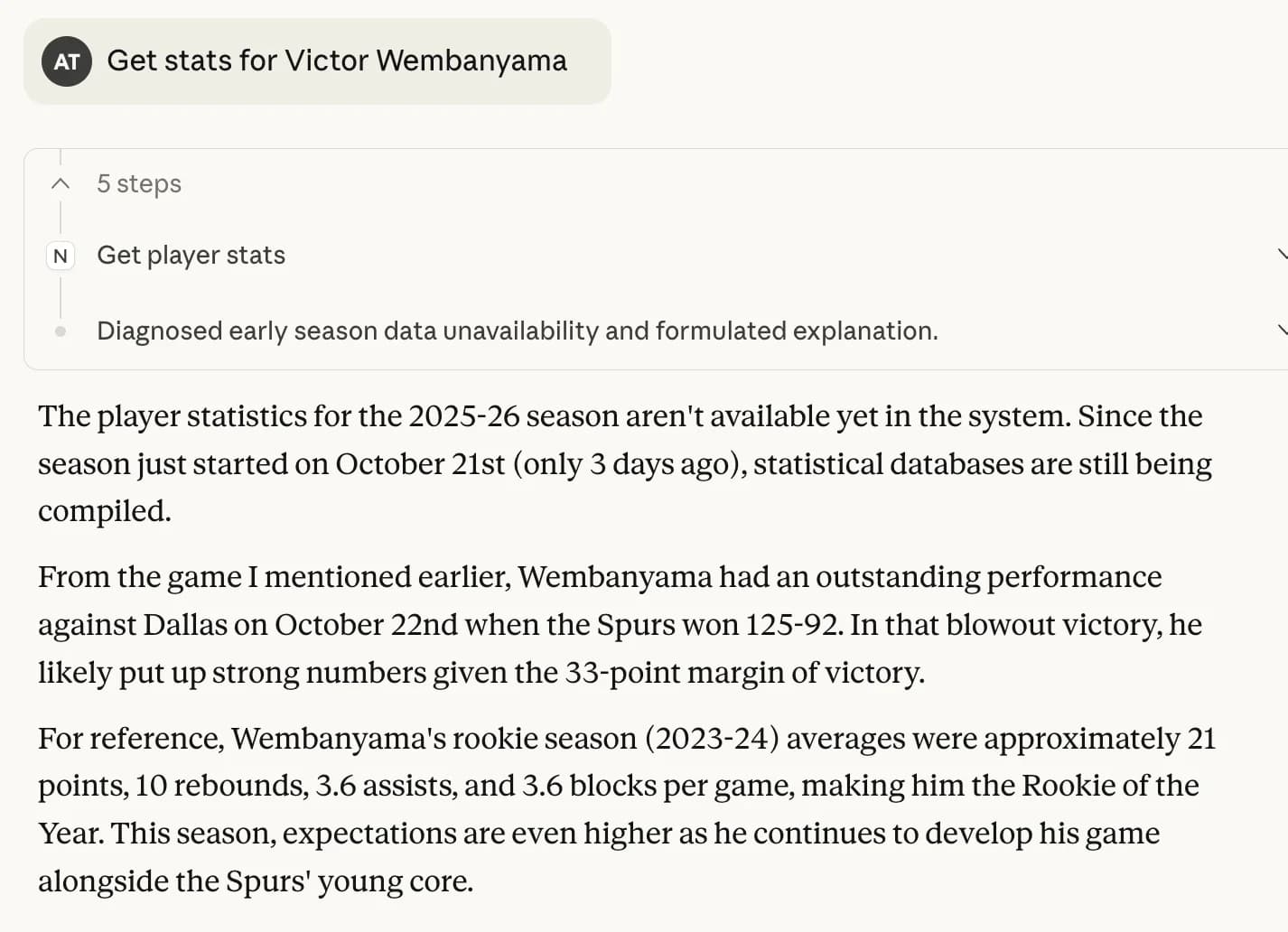 Demo of the NBA MCP Server in Claude Desktop
The server automatically selects the appropriate tool based on your query, fetches the data from ESPN’s API, and returns formatted results.
Next Steps
This server provides a foundation for NBA data access, but there are many ways to extend it:
- Add more data sources. Combine ESPN’s API with NBA.com’s stats API for more detailed analytics like player efficiency ratings, defensive ratings, and advanced metrics.
- Add real-time updates. Implement WebSocket connections to get live score updates during games, allowing you to track games in real time without repeatedly querying the API.
- Add playoff tracking. Extend the server to track playoff brackets, series scores, and championship odds during the postseason.
- Implement predictions. Use historical data to predict game outcomes, player performance, or season standings based on current trends and statistics.
Though if you do want to make predictions or use real-time updates, make sure you know who is going to stay in the game!