

The Anatomy of MCP Authorization
The Anatomy of MCP Authorization
If someone who couldn't count the number of r's in the word strawberry walked into your office and demanded access to every sensitive system you had, your answer wouldn't be "go right ahead!"
Along those lines, it probably isn’t the wisest idea to let AI go wild with data. Now that MCP gives LLMs direct access to databases, APIs, and internal tools, it’s time to start thinking pragmatically about how we give them access to sensitive systems without curtailing the obvious massive benefits.
The MCP Authorization specification is the first attempt to push things forward. With the inclusion of OAuth 2.1 for HTTP transports, authorization has become a first-class security requirement.
In this guide, we want to break down how MCP authorization works, so when you build your servers, you can implement security that protects your users' data.
What MCP Auth isn't
Before we get into the core of MCP authorization, let’s start with two important isn’ts.
MCP authorization isn’t MCP authentication
The MCP authorization flow is focused on which resources and tools a client can access. It grants and validates access tokens, but the authentication of the user, who is this, is still performed by auth providers. You are either rolling your own, or integrating with an identify provider (which may bring its own challenges, as we’ll see later).
MCP authorization isn’t mandatory
MCP servers can operate without any authorization mechanism. You SHOULD conform to this standard when you need to restrict access to MCP server resources over HTTP transport, using the OAuth 2.1 flow. But if you are using STDIO (or YOLO) you don’t have to.
The “over HTTP” part is important. The OAuth flow only applies to HTTP transport. When an MCP server runs as a local process communicating via standard input/output, the entire OAuth dance disappears.
Instead, you pass credentials through environment variables when the process starts. The MCP client spawns the server process, inherits its environment, and that's your security.
Say you are running a local GitHub server. You can directly pass it your GitHub Personal Access Token as an env variable:
{
  "mcpServers": {
    "github": {
      "command": "docker",
      "args": [
        "run",
        "-i",
        "--rm",
        "-e",
        "GITHUB_PERSONAL_ACCESS_TOKEN",
        "ghcr.io/github/github-mcp-server"
      ],
      "env": {
        "GITHUB_PERSONAL_ACCESS_TOKEN": "ghp_abc123..."
      }
    }
  }
}
The authorization flow here is:
- Claude Desktop reads your config file
- Spawns the Docker container with your GitHub PAT in the environment
- The GitHub MCP server reads GITHUB_PERSONAL_ACCESS_TOKEN from its environment
- The server uses that token to authenticate with GitHub's API
There is no network exposure, so communication happens through pipes, not HTTP endpoints. This is why the MCP spec explicitly states that STDIO transport "SHOULD NOT" use the OAuth flow. The threat model is entirely different. You're not protecting against network attackers, you're just passing secrets between local processes you control.
What is MCP authorization?
MCP Authorization is a transport-level security mechanism for HTTP-based MCP servers that implements OAuth 2.1 with specific security constraints.
Those security constraints are:
- Use the OAuth 2.1 authorization code flow with PKCE (S256)—no implicit flows, no tokens in URL fragments.
- Clients MUST include
resourcein both authorization and token requests to bind the grant to a specific MCP server. - Authorization servers MUST embed the intended audience (the server’s canonical resource URI) in tokens, and MCP servers MUST reject tokens whose audience doesn’t match exactly.
- Access tokens MUST be sent only in the
Authorization: Bearerheader on every HTTP request and MUST NOT appear in URLs or query strings.
In short, the idea is to make sure the s
When do you need MCP auth?
Any time you're exposing MCP servers with restricted tools or sensitive data over HTTP. Some examples:
- Database access servers: An MCP server that lets AI run SQL queries against your production database needs authorization to ensure only approved users can execute queries and only within their permitted scope.
- Document management servers: When exposing internal documents, wikis, or knowledge bases through MCP, you need authorization to maintain existing access controls and prevent unauthorized information disclosure.
- Third-party API wrappers: MCP servers that wrap services like GitHub, Slack, or Salesforce need authorization both to protect user credentials and to ensure AI actions respect the same permissions users have in those systems.
If your MCP server can execute database queries, read private documents, or modify system state, you need authorization. If it's just serving public weather data or running calculations without side effects, you might not.
What are the roles involved in MCP authorization?
You have three distinct parties in MCP authorization:
- MCP Server = OAuth Resource Server (holds the protected resources/tools)
- MCP Client = OAuth Client (wants to access those resources on behalf of a user)
- Authorization Server = Token issuer (validates user identity and consent, issues access tokens)
The MCP server and authorization server might be hosted together or completely separate. What matters is that the MCP server trusts the authorization server to issue valid tokens for its resources.
Here's what each party MUST and SHOULD do according to the spec:
| Role | MUST | SHOULD | Examples |
|---|---|---|---|
| MCP Server | • Return 401 with WWW-Authenticate header • Publish /.well-known/oauth-protected-resource • Validate token audience matches server • Reject tokens with the wrong audience | • Support multiple authorization servers in metadata | • GitHub MCP server • Slack MCP server • Internal database MCP server • Jira MCP server |
| MCP Client | • Parse WWW-Authenticate headers • Fetch protected resource metadata • Include resource parameter in all OAuth requests • Use PKCE for authorization code flow • Send Authorization: Bearer header on every request | • Support dynamic client registration • Cache tokens securely • Implement refresh token rotation | • Claude Desktop • Claude Code CLI • VS Code with MCP extension • Cursor • Custom tools |
| Authorization Server | • Implement OAuth 2.1 with security measures • Provide /.well-known/oauth-authorization-server • Validate redirect URIs exactly • Rotate refresh tokens for public clients | • Support dynamic client registration • Issue short-lived access tokens | • GitHub OAuth • Google OAuth 2.0 • Okta • Auth0 • Entra ID |
The beauty of this division of labor is that each party can focus on its core competency. The MCP server doesn't need to handle user authentication or consent flows; it just validates tokens. The client doesn't need to understand the server's permission model; it just obtains and presents tokens. The authorization server handles all the messy user interaction and consent management, keeping that complexity out of the MCP protocol itself.
What is the OAuth authorization code flow?
Let’s say you're building an MCP server that exposes task management capabilities. When Claude tries to create a task in a user's private workspace, your server needs to verify that the user has authorized this action. Let's walk through implementing OAuth in your MCP server by following what happens when an AI assistant needs to access protected resources.
Step 1: Rejecting unauthorized requests
Your MCP server's first responsibility is recognizing when a request lacks authorization. Every incoming request needs to be checked:
@app.post("/mcp")
def handle_mcp_request(request: Request):
    auth_header = request.headers.get("Authorization")

    if not auth_header or not auth_header.startswith("Bearer "):
        return Response(
            status_code=401,
            headers={
                "WWW-Authenticate": 'Bearer realm="TaskManager MCP", '
                'resource_metadata_uri="https://api.tasks.example.com/.well-known/oauth-protected-resource"'
            },
            content={"error": "unauthorized", "message": "Authentication required"}
        )

    # Token validation continues...
This 401 response with the WWW-Authenticate header is mandatory. It's tells clients they need authentication and where to start the process. The header must include the URI to your protected resource metadata.
Step 2: Publishing discovery endpoints
Your server must expose two discovery endpoints that are publicly accessible (no authentication required). These tell clients how to authenticate with your service:
First, the protected resource metadata at /.well-known/oauth-protected-resource:
@app.get("/.well-known/oauth-protected-resource")
def get_protected_resource_metadata():
    return {
        "resource": "https://api.tasks.example.com",  # Your server's canonical URI
        "authorization_servers": ["https://auth.example.com"],  # Can be same domain
        "bearer_methods_supported": ["header"]
    }
The resource field is the exact identifier that tokens must be scoped to. The authorization_servers array lists where clients can obtain tokens. These servers must each publish their own metadata at /.well-known/oauth-authorization-server:
@app.get("/.well-known/oauth-authorization-server")
def get_auth_server_metadata():
    return {
        "issuer": "https://auth.example.com",
        "authorization_endpoint": "https://auth.example.com/authorize",
        "token_endpoint": "https://auth.example.com/token",
        "registration_endpoint": "https://auth.example.com/register",
        "jwks_uri": "https://auth.example.com/.well-known/jwks.json",
        "code_challenge_methods_supported": ["S256"],
        "scopes_supported": ["tasks.read", "tasks.write", "tasks.delete"],
        "response_types_supported": ["code"],
        "grant_types_supported": ["authorization_code", "refresh_token"]
    }
This metadata tells clients everything they need to interact with your authorization server: where to send users for login (authorization_endpoint), where to exchange codes for tokens (token_endpoint), what security features are supported (code_challenge_methods_supported for PKCE), and where to find public keys for token validation (jwks_uri).
Here's what happens when a client encounters your 401 response:

The client now knows everything it needs: where to register (if dynamic registration is supported), where to send users for authorization, where to exchange codes for tokens, and what security features are required.
Step 3: Dynamic client registration
If your authorization server supports dynamic registration (which it should), clients can self-register without any manual setup. When a client POSTs to your /register endpoint, it provides basic information about itself: its name, where to redirect users after authorization, and what OAuth features it supports.
Your server generates a unique client_id and stores this registration. For public clients (like desktop apps or browser-based tools), you don't issue a client_secret, PKCE provides the security instead. This automatic registration is crucial for MCP because users shouldn't need to manually register every AI tool they want to use.
Without dynamic registration, you'd need an out-of-band process where users or developers manually register clients and somehow communicate the client_id to the AI. Not a great user experience.
Step 4: Proof Key for Code Exchange (PKCE)
When the client initiates authorization, several critical security measures come into play. First, the client generates PKCE parameters: a random code_verifier (typically 128 characters) and its SHA256 hash as the code_challenge. This pair ensures that only the client that started the flow can complete it.
The client then constructs an authorization URL with all required parameters:
client_id: Identifies the AI clientresponse_type=code: Requests an authorization coderedirect_uri: Where to send the user after authorizationscope: What permissions are being requestedstate: Random value to prevent CSRF attackscode_challengeandcode_challenge_method=S256: PKCE parametersresource: The canonical URI of your MCP server
# Client side - generating PKCE
import secrets
import hashlib
import base64

code_verifier = base64.urlsafe_b64encode(secrets.token_bytes(96)).decode('utf-8').rstrip('=')
code_challenge = base64.urlsafe_b64encode(
    hashlib.sha256(code_verifier.encode()).digest()
).decode('utf-8').rstrip('=')

# Server side - validating PKCE
def validate_pkce(stored_challenge: str, provided_verifier: str) -> bool:
    expected_challenge = base64.urlsafe_b64encode(
        hashlib.sha256(provided_verifier.encode()).digest()
    ).decode('utf-8').rstrip('=')

    if expected_challenge != stored_challenge:
        # Log this - might be an attack
        log_security_event("PKCE_MISMATCH", {
            "stored": stored_challenge[:8] + "...",  # Don't log full values
            "computed": expected_challenge[:8] + "..."
        })
        return False
    return True
Never accept authorization codes without valid PKCE verification. Without PKCE, here's the attack: A malicious app registers a URL handler for your callback scheme. When the legitimate authorization completes, both the legitimate app and the malicious app receive the authorization code. The attacker races to exchange it first. With PKCE, only the original client has the verifier needed to complete the exchange—the attacker gets a useless authorization code.
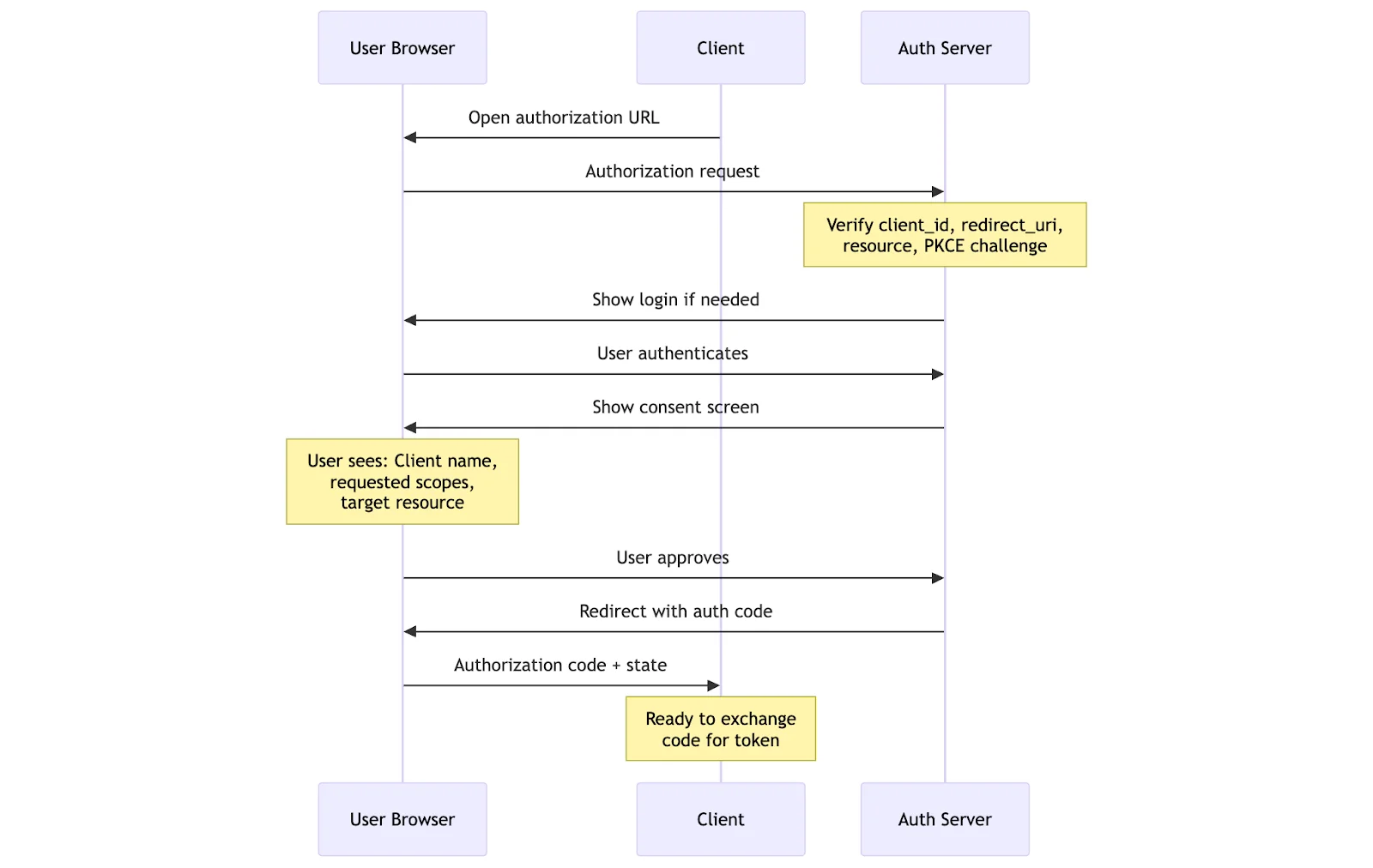
Step 5: User consent and authorization code
When the user arrives at your authorization endpoint, your server needs to:
- Authenticate the user: If they're not logged in, show a login form. This could be username/password, SSO, passkeys, or any authentication method you support.
- Validate all parameters: Check that the
client_idexists, theredirect_urimatches what was registered, and theresourceparameter matches your server. If PKCE parameters are missing or the code challenge method isn'tS256, reject the request immediately. - Show a consent screen: Display the client's name, the requested permissions, and the resource it will access. Users must explicitly approve or deny.
- Generate an authorization code: If the user approves, create a short-lived (typically 10 minutes), single-use authorization code. Store it along with all the context: user ID, client ID, scopes granted, the PKCE challenge, and the resource identifier.
- Redirect back: Send the user back to the client's
redirect_uriwith the authorization code and the originalstateparameter.
Step 6: Token exchange with proof
The token exchange is where PKCE proves its value. The client sends a POST request to your /token endpoint with the authorization code and the original code_verifier. Your server must:
- Verify the authorization code: Check it exists, hasn't expired, and hasn't been used before. Authorization codes are single-use. If you see the same code twice, revoke all tokens associated with it (someone might be attempting a replay attack).
- Validate PKCE: Hash the provided
code_verifierand compare it with the storedcode_challenge. If they don't match, someone intercepted the authorization code but doesn't have the original verifier. Reject the request. - Check the resource parameter: The client must include the same
resourceparameter used during authorization. This double-check ensures tokens are issued for the correct service. - Issue tokens: Generate an access token (and optionally a refresh token). For JWTs, include crucial claims:
sub: The user identifieraud: The resource identifier (must match the resource parameter)scope: The granted permissionsexp: Expiration timeclient_id: Which client this token was issued to
The audience (aud) claim isn't just another field in your token; it's the proof that this token was specifically issued for your MCP server and no other. When you issue a token with "aud": "https://api.tasks.example.com", you're creating a security boundary that prevents that token from being accepted by https://api.calendar.example.com or any other service, even if they use the same authorization server.
The MCP specification enforces this through the resource parameter. During authorization, the client declares which specific MCP server it wants to access. During token exchange, it must provide the same resource value. Your authorization server then embeds this as the audience in the token. Always require and validate the resource parameter. It must be present in authorization requests, token requests, and as the audience in issued tokens. This prevents token confusion attacks where tokens for one service are used at another.
Here's what validation can look like:
def validate_token(token: str, expected_resource: str = "https://api.tasks.example.com"):
    payload = jwt.decode(token, public_key, algorithms=["RS256"])

    # CRITICAL: Exact match required
    if payload.get("aud") != expected_resource:
        # This token might be valid, but not for us
        raise SecurityError(f"Token audience {payload.get('aud')} doesn't match {expected_resource}")

    # Even subdomain differences matter
    # "https://staging.api.example.com" != "https://api.example.com"
    # "https://api.example.com/v1" != "https://api.example.com/v2"
This prevents token confusion attacks. Imagine an attacker obtains a valid token meant for a low-security logging service. Without audience validation, they could replay that same token against your high-security task management server. Both tokens have valid signatures from the same authorization server, both represent authenticated users, but one was never meant to access sensitive task data.
Step 7: Validating tokens on protected requests
Now, when the client makes MCP requests with the access token, your server must thoroughly validate:
- Verify the token signature: For JWTs, use the authorization server's public keys. For opaque tokens, look them up in your database.
- Check the audience: The token's
audclaim must exactly match your server's resource identifier. This prevents tokens issued for other services from being accepted. Rejecting tokens with wrong audiences is a critical security requirement. - Validate expiration: Expired tokens must be rejected with a 401 response.
- Check scopes: Compare the token's scopes against the required scopes for the requested operation if the client wants to create tasks but only has tasks.read scope, return a 403 Forbidden with
insufficient_scopeerror. - Execute the operation: Only after all validation passes should you perform the requested action. Use the
subclaim to identify the user and apply appropriate data filtering.
Never forward MCP access tokens to upstream services. If your MCP server needs to call third-party APIs, it should obtain its own tokens for those services. The MCP server acts as a security boundary between the AI client and backend services.
Here's the wrong way (security vulnerability):
# NEVER DO THIS - Token passthrough attack
@app.post("/mcp/github/create-issue")
async def create_github_issue(request: Request):
    mcp_token = request.headers.get("Authorization")  # Token from AI client

    # WRONG: Forwarding MCP token to GitHub
    response = requests.post(
        "https://api.github.com/repos/user/repo/issues",
        headers={"Authorization": mcp_token},  # This won't work and shouldn't
        json={"title": "New issue"}
    )
Here's the right way (proper token isolation):
# CORRECT: Separate tokens for separate services
@app.post("/mcp/github/create-issue")
async def create_github_issue(request: Request):
    # 1. Validate MCP token
    mcp_token = validate_mcp_token(request.headers.get("Authorization"))
    user_id = mcp_token["sub"]

    # 2. Get user's GitHub token from secure storage
    github_token = await get_user_github_token(user_id)
    if not github_token:
        # User needs to authorize GitHub separately
        return {"error": "GitHub not connected", "auth_url": generate_github_oauth_url()}

    # 3. Use the separate GitHub token
    response = requests.post(
        "https://api.github.com/repos/user/repo/issues",
        headers={"Authorization": f"Bearer {github_token}"},
        json={"title": "New issue", "created_via": "mcp_server"}
    )
This isolation means a compromised MCP token can't directly access GitHub. You maintain separate audit trails, can revoke access independently, and respect the different scope models of each service.
Enforcing scopes
Design scopes with least-privilege in mind. Start with coarse scopes (tasks.read, tasks.write) and refine as needed. Always validate scopes before performing operations.
Scopes are contracts. Here's how to design and enforce them properly:
# Scope design evolution
# Version 1: Too coarse
SCOPES_V1 = {
    "full_access": "Complete access to all operations"  # Bad: might as well use API keys
}

# Version 2: Basic separation
SCOPES_V2 = {
    "read": "Read all resources",
    "write": "Create and modify resources"  # Better, but delete is ambiguous
}

# Version 3: Clear boundaries
SCOPES_V3 = {
    "tasks.read": "View tasks",
    "tasks.write": "Create and update tasks",
    "tasks.delete": "Delete tasks",
    "users.read": "View user information",
    "admin": "Administrative operations"
}

# Enforcement with clear error messages
def require_scope(required_scope: str):
    def decorator(f):
        def wrapped(*args, **kwargs):
            token = get_current_token()
            granted_scopes = token.get("scope", "").split()

            if required_scope not in granted_scopes:
                # Tell the client exactly what's missing
                return {
                    "error": "insufficient_scope",
                    "error_description": f"This operation requires '{required_scope}' scope",
                    "granted_scopes": granted_scopes,
                    "required_scope": required_scope
                }, 403

            return f(*args, **kwargs)
        return wrapped
    return decorator

@app.post("/tasks")
@require_scope("tasks.write")
def create_task():
    # Only runs if token has tasks.write scope
    pass
Remember: scopes in the token override everything else. Even if the user is an admin in your system, if their token only has read scope, that's all the AI agent gets. This is a feature, not a bug—users can grant limited access to powerful agents without fear.
Best practices for MCP server security
Beyond the specific implementation details covered throughout this guide, keep these principles in mind:
Start with the minimum viable authorization
Don't try to build a complex permission system on day one. Begin with basic read/write scopes and add granularity only when you have real use cases that demand it. Your initial implementation should focus on:
- Getting token validation working correctly
- Testing with short token lifetimes (5-15 minutes) to catch refresh issues early
- Building comprehensive logging before adding features
Fail closed, not open
Security systems should default to denying access when anything is ambiguous. If you can't validate a token, reject it. If a scope might not be sufficient, deny the operation. This means:
- Never have a code path that skips validation "just this once"
- Require explicit configuration to enable any less secure modes
- Return generic error messages that don't help potential attackers
Monitor everything, log carefully
You need visibility into how authorization is working, but you also need to protect sensitive data in your logs. Track authorization attempts, token usage patterns, and scope violations to identify potential security issues. But remember:
- Never log tokens, authorization codes, or PKCE verifiers—these are secrets
- Store only token hashes if you need to track usage
- Set up alerts for repeated validation failures from the same source
- Monitor for impossible travel (tokens used from geographically distant locations)
Plan for token lifecycle
Tokens aren't static. They're issued, used, refreshed, and revoked. Your server needs to handle all these states gracefully. Implement token refresh before your users notice tokens expiring, and make sure you can immediately revoke access during security incidents. Don't forget:
- Expired tokens need clear error messages so clients know to refresh
- Old authorization codes should be cleaned up regularly
- Revoked tokens should fail immediately, not at expiration
Test your security boundaries
Write tests that specifically try to break your security model:
- Verify tokens from one service are rejected by another
- Ensure expired tokens fail immediately, not eventually
- Test PKCE with intentionally wrong verifiers
- Try using tokens with insufficient scopes
- Attempt to replay old authorization codes
Consider your threat model
Different deployment scenarios have different security requirements. HTTP transport needs full OAuth 2.1 because it's exposed to network attackers. STDIO needs environment isolation because it's running locally. Think through:
- Whether your clients are public (need PKCE) or confidential (can protect secrets)
- How third-party integrations affect your token isolation requirements
- What level of audit logging you need for compliance
- Whether you need token binding for high-security environments
The security measures in this guide aren't optional optimizations—they're the minimum requirements for production MCP servers handling real user data.
How can you bridge OAuth 2.0 to OAuth 2.1?
There’s an issue with everything described above: it doesn’t necessarily play nicely with other OAuth on the web. Many enterprise identity providers still run OAuth 2.0, and that .1 matters. It mandates security features that were optional before:
- PKCE is required for all clients (not just public ones)
- Implicit flow is gone (it was insecure)
- Resource indicators bind tokens to specific services
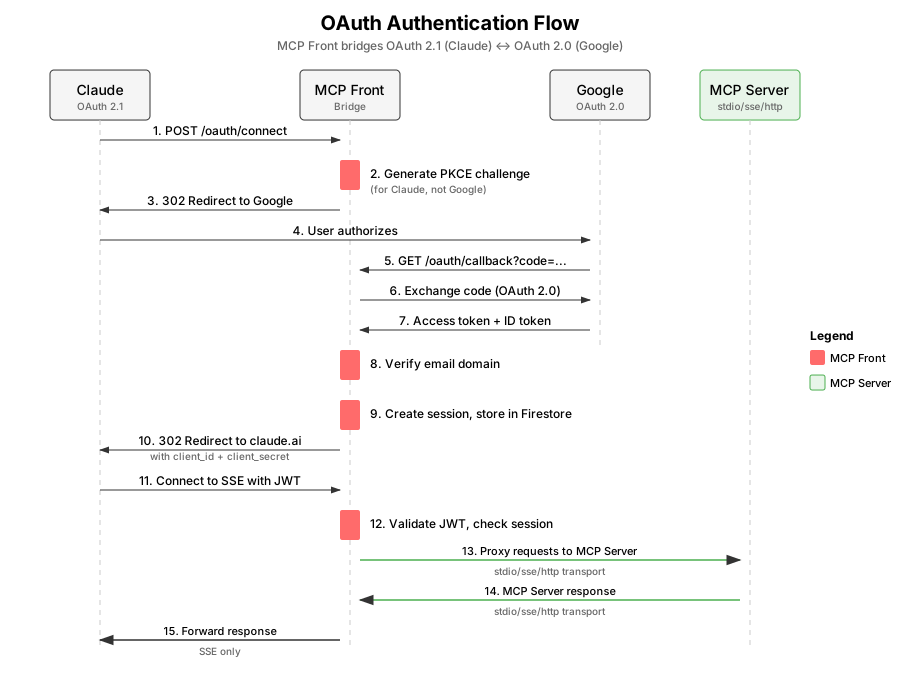
You can bridge that gap, as Stainless did to user their Google credentials to access internal services. An authentication bridge acts as a protocol translator between MCP clients and your existing identity infrastructure. It presents a fully compliant OAuth 2.1 interface to MCP clients while federating to your OAuth 2.0 identity provider behind the scenes.
Here's what the bridge does:
 oauth-flow.svg
Claude initiates the OAuth 2.1 flow with PKCE against the bridge, which then redirects to Google for OAuth 2.0 authentication. The user logs in with their account and Google returns the authorization code. The bridge then:
- Validates the user's email domain (ensuring they're part of your organization)
- Creates a session in Firestore
- Issues its own JWT back to Claude.
Finally, Claude reconnects to the bridge with this JWT, and the bridge proxies the connection to your MCP server.
The core security steps happen in the middle: the bridge generates and validates PKCE parameters when talking to Claude (OAuth 2.1 requirement), but doesn't need them when talking to Google (OAuth 2.0). It enforces domain restrictions after getting the user's identity from Google. And it maintains its own session layer, so your MCP servers just validate standard JWTs without knowing about the OAuth version mismatch happening upstream.
Over time, as standards align, shims like this will be less needed.
The next iteration of auth
There is nothing above that is mindblowing. It isn’t a “paradigm shift” nor a revolutionary breakthrough in security theory. If MCP hadn’t come along, PKCE, resource identifiers, and everything else would still have been used for better authorization in standard services.
To understand MCP authorization, just think about the division of responsibilities: MCP servers validate tokens and enforce scopes, clients handle the OAuth dance, and authorization servers manage the messy bits of user authentication and consent. Each component does one thing well, and the security properties emerge from their interaction.
The specifications exist, but the patterns and tooling are still being built out. But just follow the fundamentals: always validate audience claims, never skip PKCE, design scopes with least privilege in mind, and treat tokens as the security boundaries they are.